New — first release

Route Spoofer — drive the route without leaving your desk

An Android mock-GPS route player for testing location-based apps. It broadcasts a scripted, moving location to your whole device, so every app on the phone believes you are really out there.

Free and open source · Android · MIT License

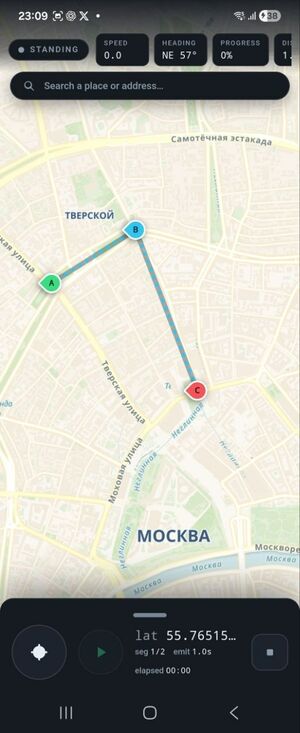
Building a route: tap the map to drop points A, B and C
Drop points on the map to build the route
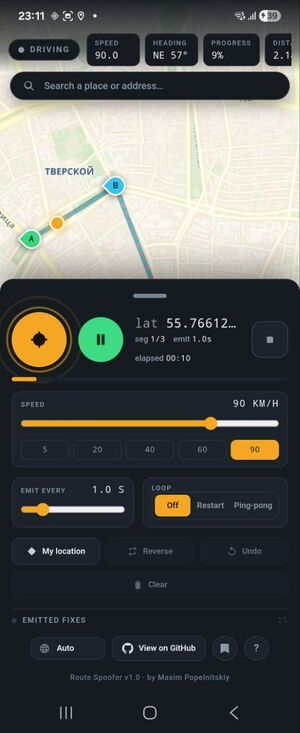
Playback running at 90 km/h with live direction and progress
Play it back at the speed you choose
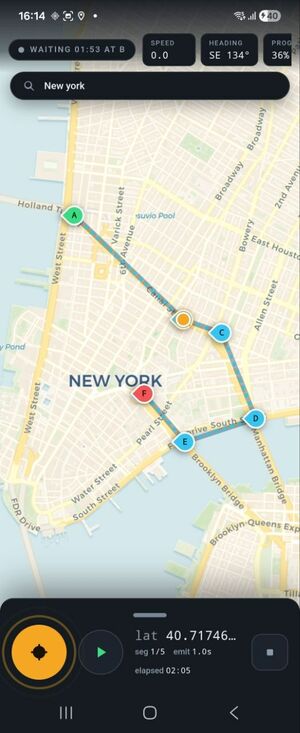
The route paused at point B, counting down the wait
Stop and wait at any point along the way
The problem

🚗 Testing location apps used to require real movement

If your product depends on where the user is — a driver app, a navigation screen, a delivery or dispatch flow — testing it has traditionally meant physically going somewhere. Walking the block to watch a marker move. Driving the route again because you missed the moment the app misbehaved. It is slow, it cannot be repeated exactly, and it is impossible on a rainy Tuesday at 2am before a release.

The idea

🛰 Simulate the movement instead

Route Spoofer plays back a route you have drawn, feeding the position to the whole device rather than to a single app. The app under test does not know the difference — it just sees a device that is moving. The same route replays identically every time, which turns a location bug from something you have to chase into something you can reproduce on demand.

Who it is for

Built for QA engineers and developers

If you work on driver, navigation, delivery or dispatch products, this is the tool that removes the car from your test loop.

🧪 Test without going anywhere

Cover the whole journey — pickup, waiting, delivery, arrival — without leaving your desk.

🔁 Reproducible regressions

Save the route that broke it and replay exactly that, every build, until it is fixed.

🎬 Believable demos

Show the product doing its thing on a real device, on a route you control.

Features

What it does

📍 GPS and movement, separate

Broadcasting a location and advancing along the route are two independent controls. Park the device somewhere and keep it there, or start moving whenever you are ready.

⏸ Stops, waits and GO

Any point can pause for a set time, or wait until you tap GO — so you can model the courier standing at the door while you check what the app does.

✏️ Build and edit live

Change the route while it is playing. No stopping, saving and starting over just to move one point.

🏎 Live speed, per segment

Speed up the boring parts, slow down where it matters, or set a different speed for one segment of the route.

💾 Saved routes

Keep your routes on the device, and export or import them as JSON to share a reproduction with the rest of the team.

🔎 Jump anywhere, and come back

Search for any place in the world, and come back later to the view you left.

Available in 8 languages: English, Russian, German, Spanish, Portuguese, French, Chinese and Hindi.

How it works

⚙️ Under the hood

A Capacitor 7 web UI handles the map and route building, while a Kotlin foreground service owns playback timing — so the route keeps running properly while you are looking at the app you are testing.

Positions are injected into both the GPS and NETWORK mock providers, which is what makes the location system-wide rather than confined to one app. Routes are stored locally, and place search uses OpenStreetMap.

How to start

🚀 Four steps

  1. Enable Developer Options — tap Build number seven times in About Phone.
  2. Install Route Spoofer from Google Play.
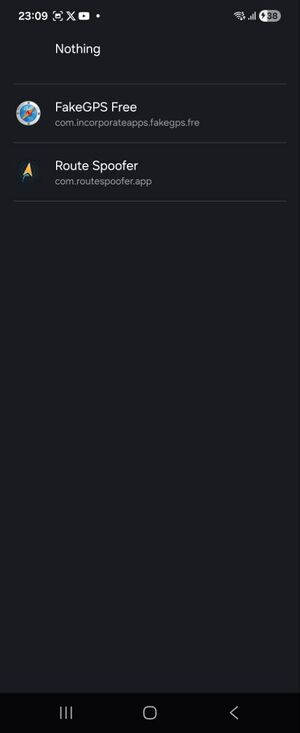
  3. Select it as the mock location app in Developer Options.
  4. Grant Location and Notifications permissions, then turn GPS on.
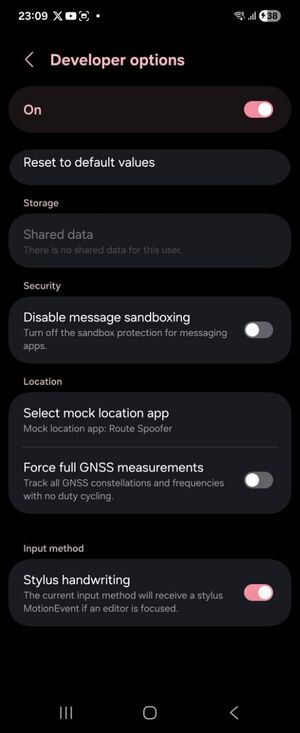
Android Developer options screen
Step 1 — Developer Options
Choosing Route Spoofer as the mock location app
Step 3 — pick the mock location app

📱 Android only

Route Spoofer is Android-only, and will stay that way: iOS has no public mock-location API, so this approach is not possible there.

Licensed under MIT. Free, open source, and available on Google Play and GitHub.